

Today, We Will Discuss The Operational Procedures Of The Automatic Control Panel Of A Diesel Generator Set.
Sep 22, 2026
Leave a message

Today, we will discuss the operational procedures of the automatic control panel of a diesel generator set.
In the previous article, we talked about the basic principles of the automatic control panel of diesel generator sets. (Explanation of the basic functions of the diesel generator set automatic control panel, suitable for beginners to understand the control panel; experienced technicians can skip this.) Today, we will talk about the operation process of the control panel, divided into five steps: pre-start inspection, manual mode operation, automatic mode, emergency shutdown, and shutdown finishing. Beginners can follow these steps without making mistakes.
Ⅰ. Basic Checks Before Powering On (Mandatory)
1. First, inspect the unit itself: ensure engine oil, coolant, and diesel levels are sufficient, with no oil or water leaks; make sure battery connections are secure.
2. Turn the key power switch on the right side of the control cabinet to ON to power the entire unit; the controller screen will light up and perform a self-check.
3. Check the screen for any red fault alarms. If there are alarms, press reset to clear them first, troubleshoot the faults, and then start.

II. Manual Mode (For Temporary Power at Construction Sites and Test Runs During Maintenance)
1. Mode Selection: Press the Manual button on the panel.
2. Start the Unit: Press the green Start button, the motor will drive the diesel engine to ignite, release the button for idle operation.
3. Preheat without Load for 3-5 Minutes, monitor the screen for voltage 400V, frequency 50Hz, and normal water temperature and oil pressure.
4. Close the Circuit to Supply Power: Press the green Close button to output three-phase electricity to the load.
5. During Load Operation, continuously monitor the red fault alarm light on the right. If it lights up, immediately reduce load and stop the engine.
6. Shutdown Procedure: First press the red Open button to cut off the load, let it cool without load for 3 minutes; then press the red Stop button to turn off the engine.
III. Auto Mode (Property/Warehouse Backup Generator, Unattended)
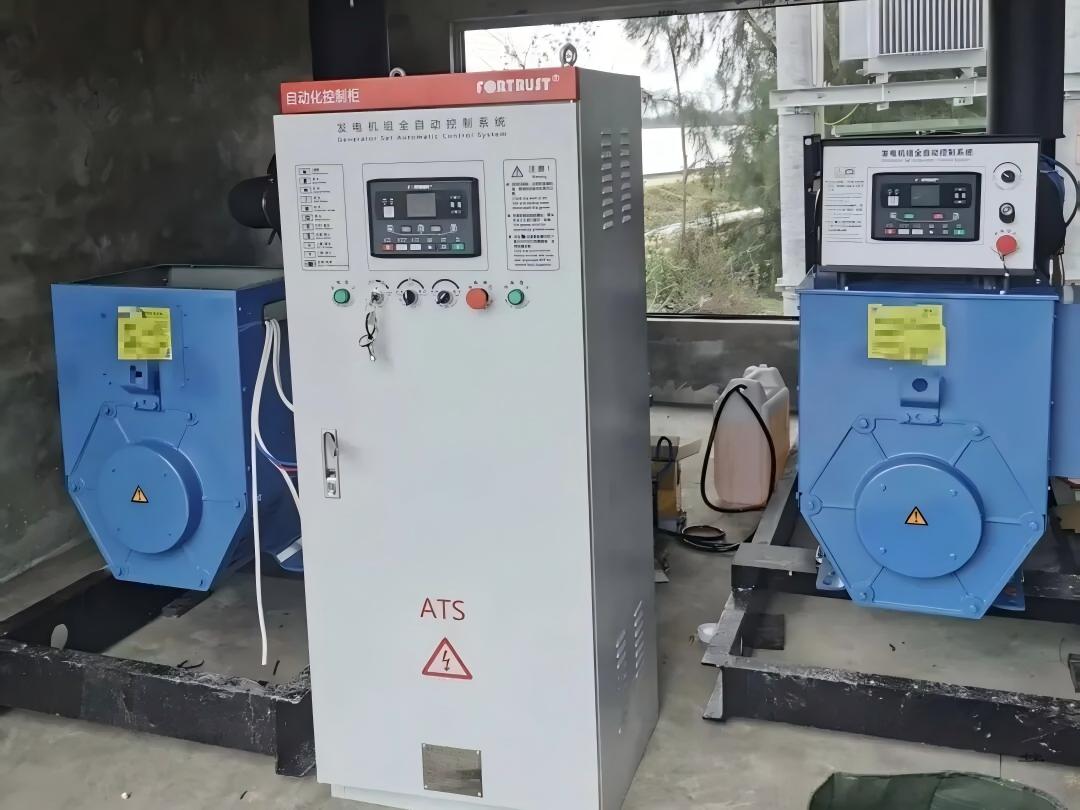
1. Complete the wiring of the mains line and ATS transfer switch cabinet, and confirm that the mains power is normal.
2. Press the Auto mode on the panel, and the controller will continuously monitor the mains voltage.
3. Automatic start logic: After the mains power is disconnected, the controller will start the generator with a delay; the generator will automatically close the breaker and supply power once the voltage and frequency meet requirements.
4. Automatic stop logic: When the mains power is restored and stable, the controller will first open the breaker to cut off the generator load, idle and cool for 3-5 minutes, then automatically stop and wait.
IV. Emergency Stop Operation (for emergency use only, normally prohibited)
In case of dangerous situations such as oil pipe rupture, smoke, severe vibration, or electric leakage:
Press the large red emergency stop button at the lower right corner, and the generator will immediately cut off fuel and shut down, quickly shutting off the entire power supply.
⚠️ Note: The emergency stop is a mandatory protection. After use, you must rotate the unlock button clockwise, then turn off and restart the controller via the key switch before starting the generator again.
V. Post-Shutdown Procedures
1. After normal shutdown, turn the key switch to OFF to cut off the main power of the control cabinet.
2. Clean dust from the panel, record the operating hours displayed on the screen, and plan maintenance cycles for the three filters and engine oil.
3. If the generator will be idle for an extended period, remove the emergency stop and cut off the power to avoid battery discharge.
Simple panel button identification (refer to the picture).

1. Controller functions: Up, down, left, and right menu keys; view voltage, water temperature, oil pressure, and fault codes;
2. Load switching: Close to connect power / Open to disconnect load;
3. Start-stop mode: Manual / Auto / Start / Stop;
4. Right cabinet accessories: Main power key, red emergency stop button.
Operation prohibitions:
1. It is strictly forbidden to forcibly start the unit when there is a fault alarm;
2. Do not press stop without first disconnecting the circuit, as it may cause impact and burn the generator winding.